
See Exact Material Needs
Before You Quote.
SpatialVision™ is a floor elevation survey software
built for residential & commercial flooring professionals.
Use 3D floor level models, material estimates, and
grind & fill maps to show residential customers what
the prep requires and help protect commercial
hard-bid margins before installation begins.
No Contract ● $1 for One Month ● Cancel Anytime
Secure signup powered by Stripe
Prefer a demo first?


See Exact
Material Needs
Before You Quote.
SpatialVision™ is a floor elevation survey software
built for residential & commercial flooring professionals.
Use 3D floor level models, material estimates, and
grind & fill maps to show residential customers what
the prep requires and help
protect commercial
hard-bid margins before installation begins.
No Contract ● $1 for One Month ● Cancel Anytime
Prefer a demo first?
Secure signup powered by Stripe
YOUR 30 DAYS
START WITH SUPPORT
Start using SpatialVision™ with confidence from day one.
LIVE DEMO/ONBOARDING
& HANDS-ON TRAINING
Learn how to use SpatialVision™ for real flooring projects and get your team comfortable with the workflow.
FLOOR LEVEL ANALYSIS GUIDANCE
Get help working through elevation data, grind & fill decisions, material estimates, and floor level analysis.
VIDEO RESOURCES &
NO-COST TOPOGRAPHIC MAP
READING & DIAGNOSIS CLASS
Get your team trained and educated
on reading and interpreting
topographic maps.
ON-CALL TECHNICAL SUPPORT
Get help when questions come up
so you can spend your 30 days using SpatialVision™, not trying to figure it out.
FAQS
How much does the 30-day trial cost?
Your first 30 days cost $1 total, starting when you sign up. Onboarding, hands-on training, and technical support are included so you can put SpatialVision™ to work on your upcoming projects.
Why is credit card information required?
Your card is used for the $1 trial payment and your monthly subscription after the trial. Contact us before your 30 days end to cancel and avoid monthly subscription charges.
Can I cancel my trial or monthly subscription at any time?
Yes. Simply contact our team to cancel your trial or monthly subscription. To avoid monthly charges after your trial, contact us before your 30-day trial ends.
What happens after my 30-day trial?
Unless you cancel, monthly billing begins automatically after your trial. One organization with one user costs $129/month—$75 for hosting plus $54 for the user. Each additional user costs $54/month. If there are two users, it's $75 for hosting plus $54 for each user = $183.
$75 hosting is for the entire organization and you only add $54 for each user.
Am I committed to a long-term contract?
No. Your subscription runs month-to-month after the trial, and you can contact us to cancel at any time.
How does the money-back guarantee work?
Our guarantee covers your first paid subscription month after the $1 trial. If you actively use SpatialVision™ during that month and aren’t satisfied, contact us to request a refund of that month’s subscription fee.
The guarantee does not cover accumulated charges for months when you haven’t used the software. If you’ve delayed getting started, contact us so we can help you begin using SpatialVision™ and discuss whether a later month of active use may qualify for a refund.
YOUR 30 DAYS START WITH SUPPORT
Start using SpatialVision™ with confidence from day one.
LIVE DEMO/ONBOARDING & HANDS-ON TRAINING
Learn how to use SpatialVision™ for real flooring projects and
get your team comfortable with the workflow.
FLOOR LEVEL ANALYSIS GUIDANCE
Get help working through elevation data, grind & fill decisions,
material estimates, and floor level analysis.
VIDEO RESOURCES & NO-COST TOPOGRAPHIC MAP
READING & DIAGNOSIS CLASS
Get your team trained and educated on reading
and interpreting topographic maps.
ON-CALL TECHNICAL SUPPORT
Get help when questions come up so you can spend your 30 days
using SpatialVision™, not trying to figure it out.
FAQs
How much does the 30-day trial cost?
Your first 30 days cost $1 total, starting when you sign up. Onboarding, hands-on training, and technical support are included so you can put SpatialVision™ to work on your upcoming projects.
Why is credit card information required?
Your card is used for the $1 trial payment and your monthly subscription after the trial. Contact us before your 30 days end to cancel and avoid monthly subscription charges.
Can I cancel my trial or monthly subscription at any time?
Yes. Simply contact our team to cancel your trial or monthly subscription. To avoid monthly charges after your trial, contact us before your 30-day trial ends.
What happens after my 30-day trial?
Unless you cancel, monthly billing begins automatically after your trial. One organization with one user costs $129/month—$75 for hosting plus $54 for the user. Each additional user costs $54/month. If there are two users, it's $75 for hosting plus $54 for each user = $183.
$75 hosting is for the entire organization and you only add $54 for each user.
Am I committed to a long-term contract?
No. Your subscription runs month-to-month after the trial, and you can contact us to cancel at any time.
How does the money-back guarantee work?
Our guarantee covers your first paid subscription month after the $1 trial. If you actively use SpatialVision™ during that month and aren’t satisfied, contact us to request a refund of that month’s subscription fee.
The guarantee does not cover accumulated charges for months when you haven’t used the software. If you’ve delayed getting started, contact us so we can help you begin using SpatialVision™ and discuss whether a later month of active use may qualify for a refund.
PUT YOUR 30-DAY TRIAL TO WORK ON AS MANY
UPCOMING BIDS AS YOU WANT
PUT YOUR 30-DAY TRIAL TO WORK ON AS MANY UPCOMING BIDS
AS YOU WANT
SIMPLE, STRAIGHTFORWARD PRICING
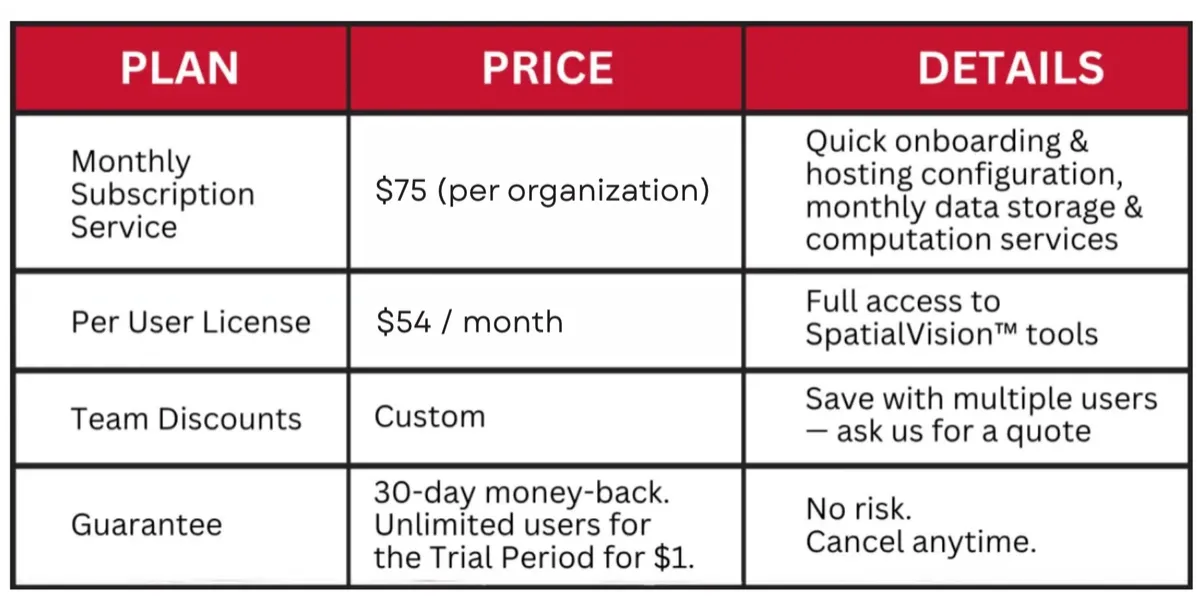
SAMPLE PRICING BREAKDOWN:
1 organization with 1 user
First 30 days: $1 total
After your trial: $129/month
($75 hosting + $54 for one user)
1 organization with 2 users
First 30 days: $1 total
After your trial: $183/month
($75 hosting + $54 per user)
Need multi-seat access
or enterprise support?
⚙️ Contact us for custom pricing. ⚙️
SIMPLE, STRAIGHTFORWARD PRICING
SAMPLE PRICING BREAKDOWN:
1 organization with 1 user
First 30 days: $1 total
After your trial: $129/month
($75 hosting + $54 for one user)
1 organization with 2 users
First 30 days: $1 total
After your trial: $183/month
($75 hosting + $54 per user)
⚙️ Need multi-seat access or enterprise support? Contact us for custom pricing. ⚙️
Eliminate Overbidding and Costly Overruns
Eliminate Overbidding and Costly Overruns
Eliminate Overbidding and Costly Overruns
Eliminate Overbidding and Costly Overruns
Eliminate Overbidding and Costly Overruns
Eliminate Overbidding and Costly Overruns
Eliminate Overbidding and Costly Overruns
Eliminate Overbidding and Costly Overruns

Quote with Better Information
Use calculated material quantities and cost
scenarios before the job starts.
Show Crews Exactly Where Material Goes
Use color-coded grind & fill maps to give crews
clear visual direction.
Compare Grind vs. Fill Strategies
See how different prep approaches affect material
quantities and projected cost before work begins.
Accurate Material Estimates
Instant bag/yard counts and total cost by scenario.
Pinpoint Placement Maps
Colored overlays that show exact placement areas
Control Grind & Fill
Switch strategies and see material & cost change in real time.

Accurate Material Estimates
Instant bag/yard counts and total cost by scenario.
Pinpoint Placement Maps
Colored overlays that show exact placement areas
Control Grind & Fill
Switch strategies and see material & cost change in real time.
Accurate Material Estimates
Instant bag/yard counts and total cost by scenario.
Pinpoint Placement Maps
Colored overlays that show exact placement areas
Control Grind & Fill
Switch strategies and see material & cost change in real time.
Accurate Material Estimates
Instant bag/yard counts and total cost by scenario.
Pinpoint Placement Maps
Colored overlays that show exact placement areas
Control Grind & Fill
Switch strategies and see material & cost change in real time.
Accurate Material Estimates
Instant bag/yard counts and total cost by scenario.
Pinpoint Placement Maps
Colored overlays that show exact placement areas
Control Grind & Fill
Switch strategies and see material & cost change in real time.
Win More Bids ● Protect Your Margins ● build client confidence
Reduce Risk in the Bid
Base your proposal on measured floor conditions instead
of relying on assumptions about unseen high and low areas.
Protect Your Margins
Know more about prep scope and material needs before
the price is committed.
Build Trust with Homeowners, GCs, and Clients
Use clear floor models and grind & fill maps to show
what the floor needs and support the numbers
behind your proposal.
Easily explain complex foundation issues to homeowners
Help homeowners clearly understand the need for repairs
Close more deals with faster homeowner decision-making

Eliminate risky guesswork
Instantly generate precise slab models so your quotes are accurate the first time.
Protect your margins
Get engineering-grade material estimates and visual placement maps to avoid costly overruns.
Build trust with GCs and homeowners
Hand over clear plans that show exactly where to fill or grind — and why your number is right.
Easily explain complex foundation issues to homeowners
Help homeowners clearly understand the need for repairs
Close more deals with faster homeowner decision-making
(DEMO starts at 1:42 and ends at 7:10)

DeFEND YOUR WORK
Eliminate Overbidding and Costly Overruns
Eliminate Overbidding and Costly Overruns
Eliminate Overbidding and Costly Overruns
Eliminate Overbidding and Costly Overruns
Eliminate Overbidding and Costly Overruns
Eliminate Overbidding and Costly Overruns
Eliminate Overbidding and Costly Overruns
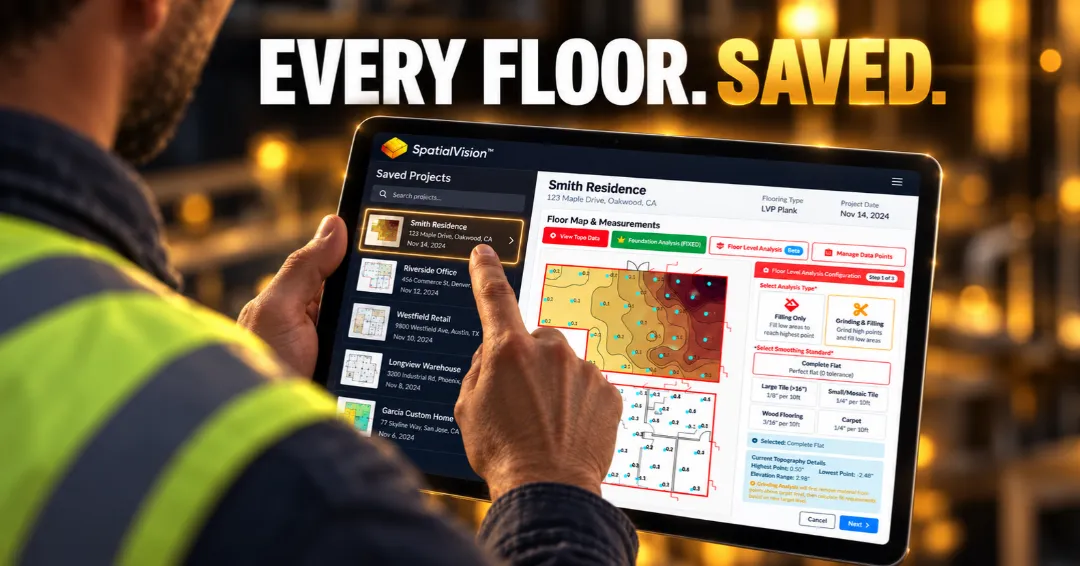
Document the Prep
Use SpatialVision™ maps and calculations to create
a record of the measured floor conditions, grind-and-fill
plan, and material requirements behind the work.
Show the Basis for Your Decisions
Show exactly what was measured, what prep was planned,
and how the quantities were calculated before installation
began.
Protect Yourself After Installation
If questions come up later, you have documented evidence
showing the basis for the prep and installation decisions.
Accurate Material Estimates
Instant bag/yard counts and total cost by scenario.
Pinpoint Placement Maps
Colored overlays that show exact placement areas
Control Grind & Fill
Switch strategies and see material & cost change in real time.
Accurate Material Estimates
Instant bag/yard counts and total cost by scenario.
Pinpoint Placement Maps
Colored overlays that show exact placement areas
Control Grind & Fill
Switch strategies and see material & cost change in real time.
Accurate Material Estimates
Instant bag/yard counts and total cost by scenario.
Pinpoint Placement Maps
Colored overlays that show exact placement areas
Control Grind & Fill
Switch strategies and see material & cost change in real time.
Accurate Material Estimates
Instant bag/yard counts and total cost by scenario.
Pinpoint Placement Maps
Colored overlays that show exact placement areas
Control Grind & Fill
Switch strategies and see material & cost change in real time.
Accurate Material Estimates
Instant bag/yard counts and total cost by scenario.
Pinpoint Placement Maps
Colored overlays that show exact placement areas
Control Grind & Fill
Switch strategies and see material & cost change in real time.
ELIMINATE OVERBIDDING
AND COSTLY OVERRUNS
Eliminate risky guesswork
Instantly generate precise slab models so your quotes are accurate the first time.
Protect your margins
Get engineering-grade material estimates and visual placement maps to avoid costly overruns.
Build trust with GCs and homeowners
Hand over clear plans that show exactly where to fill or grind — and why your number is right.
Quote with Better Information
Use calculated material quantities and cost scenarios before the job starts.
Show Crews Exactly Where Material Goes
Use color-coded grind & fill maps to give crews clear
visual direction.
Compare Grind vs. Fill Strategies
See how different prep approaches affect material
quantities and projected cost before work begins.
Win More Bids
Protect Your Margins
BUILD CLIENT CONFIDENCE
Eliminate risky guesswork
Instantly generate precise slab models so your quotes are accurate the first time.
Protect your margins
Get engineering-grade material estimates and visual placement maps to avoid costly overruns.
Build trust with GCs and homeowners
Hand over clear plans that show exactly where to fill or grind — and why your number is right.
Reduce Risk in the Bid
Base your proposal on measured floor conditions instead of relying on assumptions about unseen
high and low areas.
Protect Your Margins
Know more about prep scope and material needs before
the price is committed.
Build Trust with Homeowners, GCs, and Clients
Use clear floor models and grind & fill maps to show what the floor needs and support the numbers behind your proposal.
DEFEND YOUR WORK
Eliminate risky guesswork
Instantly generate precise slab models so your quotes are accurate the first time.
Protect your margins
Get engineering-grade material estimates and visual placement maps to avoid costly overruns.
Build trust with GCs and homeowners
Hand over clear plans that show exactly where to fill or grind — and why your number is right.
Document the Prep
Use SpatialVision™ maps and calculations to create a record of the measured floor conditions, grind-and-fill
plan, and material requirements behind the work.
Show the Basis for Your Decisions
Show exactly what was measured, what prep was planned, and how the quantities were calculated before installation began.
Protect Yourself After Installation
If questions come up later, you have documented evidence
showing the basis for the prep and installation decisions.
SEE HOW FLOORING CONTRACTORS ARE USING SPATIALVISION™
(Demo snippets 1:13 - 6:20)
SEE HOW FLOORING CONTRACTORS
ARE USING SPATIALVISION™
(Demo snippets 1:13 - 6:20)
take the first step towards a
smarter, more profitable flooring business
take the first towards a
smarter, more profitable flooring business
BOOST YOUR SALES WITH SPATIALVISION™
Helping you bid smarter, plan better, and protect your margins.
Helping you bid smarter, finish faster, and protect your margins.
Data-Driven Foundation Repair Solution Designed for Contractors
take the first step towards a
smarter, more profitable
flooring business

Helping you bid smarter,
plan better, and
protect your margins.
Got Questions?